The standard US comic book page is 6.625 × 10.25 inches at trim, and 6.875 × 10.5 inches with bleed. Those two numbers answer most questions, but not all: printers differ on the safe area, artists often draw bigger than print size, and manga, graphic novels and webtoons each have their own conventions. This page puts every size you are likely to need in one place, in inches, millimeters and pixels.
Quick Summary
- Trim (finished page): 6.625 × 10.25 in, about 168 × 260 mm.
- Bleed (art that reaches the edge): add 0.125 in on every side, so 6.875 × 10.5 in.
- Safe area (keep text inside): commonly about 0.25 in inside the trim, roughly 6.125 × 9.75 in. Some printers use a smaller live area, such as 6 × 9 in.
- At 300 dpi the trim is 1988 × 3075 px and the bleed size 2063 × 3150 px.
- Always check your printer’s template. There is no single official standard.
The three sizes on every comic page
- Trim size is the finished page after the printer cuts it. This is the number people mean by “page size”.
- Bleed is extra art beyond the trim, usually 0.125 in (3 mm) on each side. Cutting is never perfectly accurate, so any background that should touch the edge has to extend past it.
- Safe area (or live area) is the zone inside the trim where nothing important gets cut or lost in the binding. Dialogue, captions and faces stay inside it.
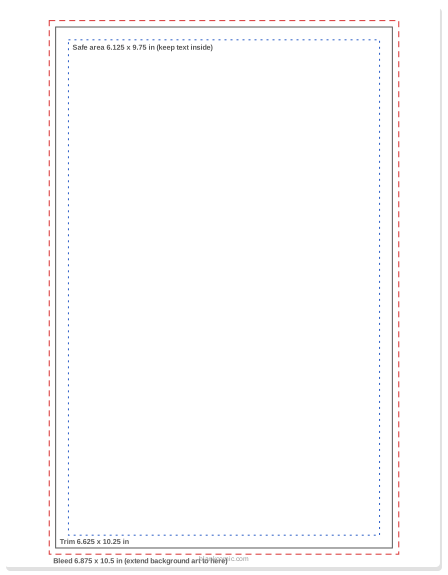
US comic page at actual size
One page at 6.875 × 10.5 in with the trim and safe area marked. Use it as a print-shop reference or to set up a digital canvas.
Comic page guides on Letter or A4
The same guides centered on a normal sheet, for pencilling at print size on a home printer.
Comic page size chart
Pixel sizes are at 300 dpi, the usual resolution for printed color comics, rounded to the nearest pixel.
| Format | Inches | Millimeters | Pixels at 300 dpi | Notes |
|---|---|---|---|---|
| US comic, trim | 6.625 × 10.25 | 168 × 260 | 1988 × 3075 | Standard modern comic book |
| US comic, with bleed | 6.875 × 10.5 | 175 × 267 | 2063 × 3150 | Set your canvas to this if art goes to the edge |
| US comic, safe area | ≈ 6.125 × 9.75 | ≈ 156 × 248 | ≈ 1838 × 2925 | Varies by printer; some use 6 × 9 in |
| Original art board | 11 × 17 sheet, ≈ 10 × 15 image | 279 × 432 | 3300 × 5100 | Traditional pages are drawn about 1.5× print size |
| Graphic novel / trade paperback | 6 × 9 or 7 × 10 common | 152 × 229 / 178 × 254 | 1800 × 2700 / 2100 × 3000 | Common print-on-demand trims |
| Manga magazine page (B5) | 7.17 × 10.12 | 182 × 257 | 2150 × 3035 | Japanese magazine size |
| US Letter | 8.5 × 11 | 216 × 279 | 2550 × 3300 | Home printing in North America |
| A4 | 8.27 × 11.69 | 210 × 297 | 2480 × 3508 | Home printing everywhere else |
| Webtoon (WEBTOON Canvas) | — | — | 800 px wide, up to 1280 px per image | Pixels, not inches; see the webtoon guide |
For webtoons the rules are completely different, because the reader scrolls a single strip on a phone: see webtoon canvas size in pixels. For manga paper sizes in detail, including B4 manuscript sheets, read manga manuscript paper vs Western comic templates.
How to work out the pixel size yourself
Pixels = inches × dpi. For millimeters, divide by 25.4 first. So a 6.875 in wide bleed canvas at 300 dpi is 6.875 × 300 = 2062.5, rounded to 2063 px. At 600 dpi, the resolution often used for black-and-white line art, everything doubles.
| US comic size | 300 dpi | 600 dpi |
|---|---|---|
| Trim 6.625 × 10.25 in | 1988 × 3075 px | 3975 × 6150 px |
| Bleed 6.875 × 10.5 in | 2063 × 3150 px | 4125 × 6300 px |
| Safe 6.125 × 9.75 in | 1838 × 2925 px | 3675 × 5850 px |
Tip: Black-and-white line art benefits from 600 dpi because thin lines stay crisp; color pages are usually fine at 300 dpi. The export guide explains when the extra resolution matters.
Drawing bigger than print size
Traditional American comic art is drawn on 11 × 17 in boards with an image area of roughly 10 × 15 in, about 1.5 times the printed size. Shrinking the art makes lines look tighter and hides small wobbles. The proportions are what matter: as long as your canvas has the same shape as the trim, it will scale cleanly.
If you draw on paper and scan, scan at the original size at 600 dpi and scale down later. Our guide to scanning hand-drawn comic pages covers settings and clean-up.
Bleed and safe area, in practice
- Full-bleed panel: extend the art 0.125 in past the trim on every side that touches the edge.
- Panel borders near the edge: keep them inside the safe area, or take them all the way into the bleed. A border that stops 1 mm from the trim will look like a printing mistake.
- Text: never outside the safe area. Some letterers leave even more room near the spine.
- No bleed at all: fine for a blank book or a school project; the page size is simply the trim size.
Check this: Print-on-demand services add their own rules. Amazon KDP, for example, measures bleed differently and sets margins by page count; see the KDP blank comic book interior guide for those numbers.
Which size should you use?
| Your project | Use |
|---|---|
| A comic you will print as a standard comic book | Canvas 6.875 × 10.5 in (bleed), trim 6.625 × 10.25 in |
| A school project or zine on a home printer | Letter or A4 with a margin, no bleed |
| A graphic novel through print on demand | The service’s trim (often 6 × 9 or 7 × 10 in) plus its bleed rules |
| A manga-style book | B5 or a smaller paperback size; check with the printer |
| A webcomic or webtoon | 800 px wide strips, no inches involved |
Setting the page size in BlankComic
The BlankComic editor has presets for US Comic, A4, Manga, Square and Webtoon, plus a custom size entered in pixels at 72 px per inch. The presets are convenient for drafting, but none is exactly the 6.625 × 10.25 in print trim, so for a print file choose Custom and enter 495 × 756 px (the bleed size) or 477 × 738 px (trim only). The editor also shows a 3 mm bleed line and a safe zone. Download at the Print (300 DPI) setting, then check the pixel size against the chart above before sending it to a printer.
Frequently Asked Questions
What is the standard comic book page size?
The standard US comic book trim size is 6.625 × 10.25 inches. With 0.125 in bleed on every side, the full page is 6.875 × 10.5 inches.
What size is a comic book page in pixels?
At 300 dpi, the trim size is about 1988 × 3075 px and the bleed size about 2063 × 3150 px. At 600 dpi, double those numbers.
What is the safe area on a comic page?
The safe or live area is the zone where text and important art will not be cut. It is commonly about 0.25 in inside the trim (about 6.125 × 9.75 in), but some printers specify 6 × 9 in, so check their template.
What size paper do comic artists draw on?
Traditionally 11 × 17 in boards with an image area of about 10 × 15 in, roughly 1.5 times the printed size. Many digital artists work at print size and 600 dpi instead.
Is a manga page the same size as a comic book page?
No. Japanese manga magazines commonly use B5 (182 × 257 mm), and paperback volumes are smaller still. US comics are 6.625 × 10.25 in.
Do I need bleed on my comic?
Only if art or color touches the edge of the page. Then extend it 0.125 in past the trim. A comic with white borders all round can be set up without bleed.
Sources and further reading
Facts in this guide were checked against the following resources. All are free to read.
- PrintNinja, “Make A Modern Comic Book”: 6.625 × 10.25 in standard trim and 0.125 in bleed.
- ComixTribe, “B&N Week 60: Page Sizes”: Bleed 6.875 × 10.5 in, trim around 6.625 × 10.25 in, a 6 × 9 in live area, and the note that there is no universal standard.